
Executive Visibility
When Missing Dashboard Data Should Change the Decision
Published October 12, 2026 · Jennifer L. Pick
Learn how to handle missing owners, dates, budgets, and spend in an executive dashboard without turning incomplete information into false confidence.
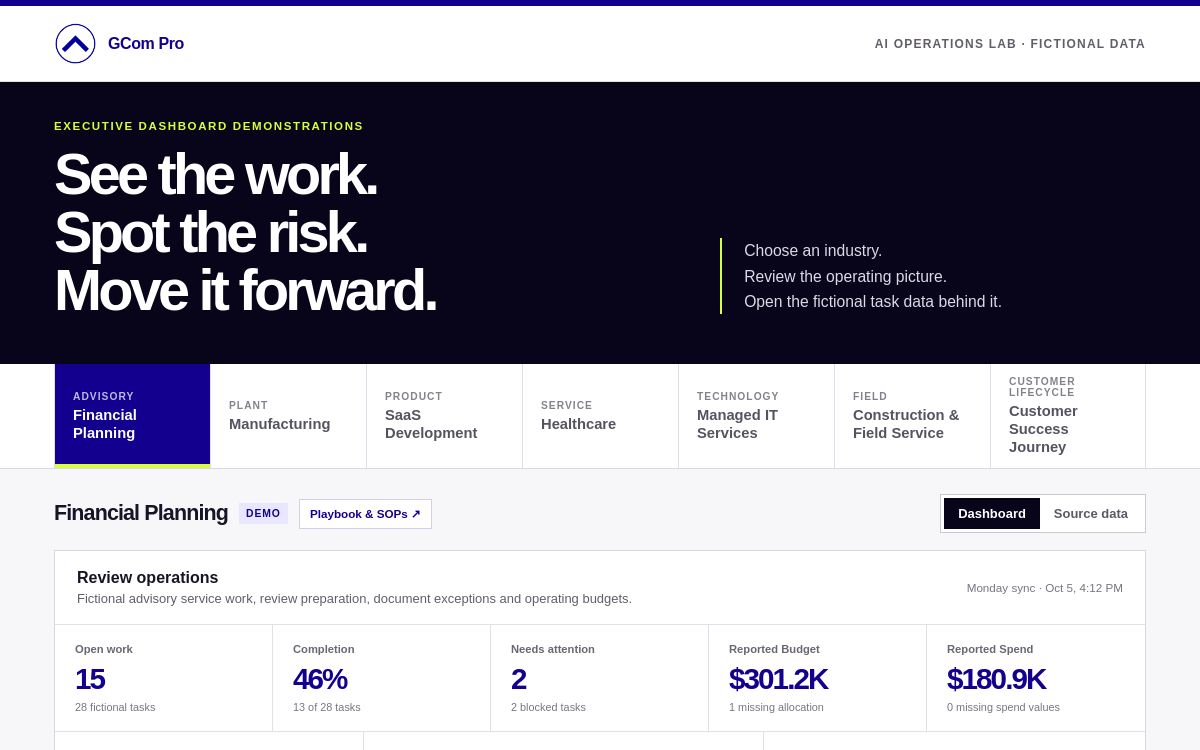
A dashboard can look reassuring while leaving a leader with an incomplete picture. A project appears in progress. The chart has a total. The weekly conversation moves on. But if an owner, due date, or actual-spend value is missing, the display may not support the decision being made.
At GCom Pro, we treat those gaps as part of the operating picture. Our public Executive Dashboard demonstration makes that distinction visible: missing values are shown as missing rather than silently treated as zero. Every organization, task, budget, and result in the demo is fictional. It is a way to explore a management approach, not evidence of customer results.
Start with the decision, then inspect the inputs
Before interpreting a dashboard, name the decision it should support. Are you deciding whether work needs an escalation? Whether a commitment is at risk? Whether budget information is complete enough for a review? Each question needs different evidence.
A missing due date may prevent a reliable judgment about lateness. A missing owner can make the next action unclear. An absent actual-spend value does not establish that nothing has been spent. The first useful question is therefore not whether the chart looks good. It is whether the information needed for this decision is present.
Walk through the fictional demonstration
Open the Executive Dashboard demo and choose an industry view. Focus on one task and ask what you would need to know before making a commitment about it. Look for the owner, timing, next action, and the financial information relevant to your decision.
Treat that review as a management exercise. A clear display can help you notice a gap, but someone still needs to resolve it. If the record does not identify an accountable owner, decide who will establish ownership. If timing is absent, establish a realistic commitment before classifying the work as late or on track.
Keep unknown separate from zero
Imagine a fictional implementation project with a budget recorded and no actual-spend entry. The blank field supports one conclusion: the recorded information is incomplete. It does not tell you that the project has used none of its budget.
Entering zero simply to make the chart look complete changes the meaning of the information. It can make available budget appear larger than it is and shift attention away from a project that needs review. The useful response is to identify who can supply the number, when it will be available, and which decision must wait.
The same distinction applies beyond finance. An empty renewal date does not mean a renewal is safely in the future. An unrecorded customer-health assessment does not establish that the relationship is healthy. Leaders need a visible way to distinguish a measured result from an assumption.
Choose an action that matches the gap
Not every blank field deserves the same urgency. Start with the decision it affects. If missing information prevents a client commitment, financial approval, or assignment of work, address it before making that commitment. If the gap has no immediate effect, assign a practical correction date.
Write the next action so another person can execute it. “Update the dashboard” is vague. “Confirm the actual spend with the project owner and record the reporting date before the budget review” describes an action, an owner to consult, and a reason it matters.
A useful review ends with ownership and a next step. It should not create another recurring meeting whose only outcome is asking whether someone has updated the same field.
Improve the point where information enters
If the same type of information keeps disappearing, examine the workflow that should capture it. Is there a defined owner? Is the field requested at the right moment? Can the person entering it access a reliable source? Does the handoff explain what complete means?
Resolve those questions where the work happens. A better intake requirement or handoff can prevent the dashboard from becoming a permanent cleanup exercise. Keep enough flexibility for a legitimate unknown, with a named person responsible for resolving it.
The purpose of an executive dashboard is to support a sound next decision. Sometimes its most valuable signal is the information that is still missing.
Explore GCom Pro’s fictional Executive Dashboard at https://executive-dashboard.site/operations and inspect one record with incomplete information. Ask which decision that gap changes—and what the next action should be.